Overview

Readiness across your Mahilo network.

Readiness dashboard

Hello, Friend

See whether your sender setup, network, and review required work are ready for Mahilo right now.

Loading your Mahilo readiness...

๐Ÿค– Sender Readiness

๐Ÿค–

No sender connections yet

Add one so Mahilo can send and ask around.

๐Ÿ‘ฅ Network Readiness

๐Ÿ‘‹

Build your circle to see who is ready now

๐Ÿ“‹ Review and Delivery Activity

๐Ÿ’Œ

No review or delivery activity yet

Review required items, blocked events, and ask-around replies show up here.

๐Ÿค–

No sender connections yet

Add a sender connection so Mahilo can send directly, ask around, and route review required work back to you.

Your circle

All relationships

Accepted contacts, pending requests, and blocked people across the circle Mahilo can reach.

0 relationships
๐Ÿค

Build your circle

Add the people you trust so Mahilo has a circle to ask around with.

๐Ÿงญ

Open a connection space

Select someone from your circle to see whether they have sender connections live and whether they are ready for direct send or ask-around.

Build circles you can ask around with and target with group boundaries.

Ask-around circles

Working groups

Use groups to shape ask-around circles, manage invites, and see whether a circle is ready to target.

0 groups
๐Ÿ˜๏ธ

No groups yet

Create a circle you can ask around with and target with group boundaries.

๐Ÿงญ

Open a group workspace

Select a group to see who is active, who is invited, and whether the circle is ready for ask-around and group boundaries.

๐Ÿ’ฌ Direct Messages

Pick a friend to continue the conversation

๐Ÿ’ฌ

No conversations yet

Accepted friends appear here automatically

โœ‰๏ธ

Your network inbox

Select a network contact to view history and send a message.

Messages use your active Mahilo sender connection.

๐Ÿ“‹

No delivery activity yet

Review required items, blocked events, deliveries, and ask-around activity will appear here.

๐Ÿ› ๏ธ

Advanced Setup and Diagnostics

Developer keeps API-key utilities, diagnostics, and test flows available without crowding the primary product path. Use talk_to_agent in your agent framework for normal messaging and keep this surface for setup, verification, and debugging.

Runtime access

Current dashboard API key

Reveal or copy the advanced credential loaded into this dashboard session, then regenerate it when you need a fresh key for your agent runtime.

Advanced
mhl_...

Available only in this page so you can copy it without leaving it visible on screen.

This key is not used for browser sign-in. Mahilo cannot recover an older lost key.

Use this key in your agent runtime config: mahilo_api_key: "..."

Diagnostics

Sender connection health

Verify which sender Mahilo will choose, inspect current health signals, and run connection checks without leaving the advanced workspace.

๐Ÿค–

No sender connections yet

Add a sender connection before running diagnostics

Browser access

Recent sign-in attempts

Inspect recent browser-login codes, replay blocks, expiry outcomes, and throttled approvals without opening raw database state.

Unavailable here

Controls intentionally kept out of the dashboard

Unsupported or operator-only workflows stay explicit instead of looking like broken buttons.

Recover a lost API key

Mahilo only returns a new key when you regenerate it. If the current key is gone, rotate it and update your agent runtime.

Admin-only account resets

Creating users, resetting other users, and invite administration stay off the user dashboard and require operator access.

Normal agent-tool conversations

Use talk_to_agent in your agent framework for normal product behavior. The dashboard console stays limited to direct debugging flows.

Test messaging

Direct send checks

Send a controlled message through /api/v1/messages/send to verify routing, policy outcomes, and delivery logs from the dashboard.

๐Ÿ”ง Test Targets

Accepted network contacts only. Delivery still depends on sender and recipient readiness.

๐Ÿ’ฌ

No network contacts available

Build your network first to test messaging

๐Ÿงช

Direct Send Check

Select an accepted network contact to run a controlled delivery test

Use this to verify routing, policy outcomes, and delivery logs without switching tools

Boundaries

See what Mahilo can share at a glance

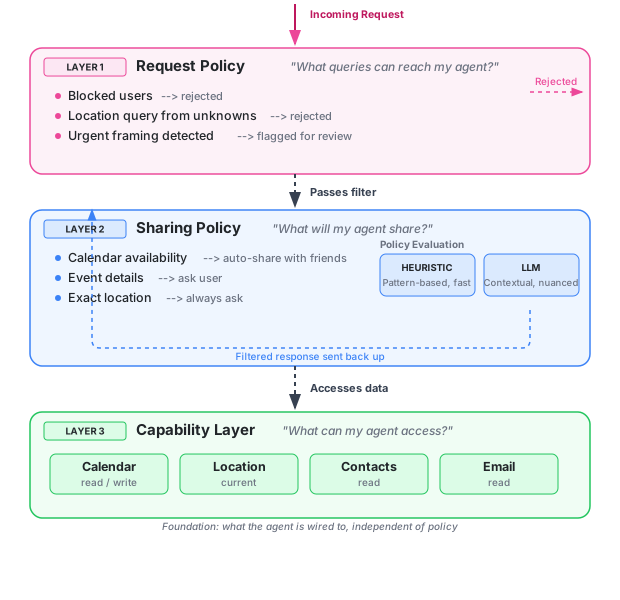
Browse boundaries by category and audience to understand what gets shared automatically, marked as review required, or blocked outright.

Audience

Keep global, contact, role, and group boundaries one tap away.

Category

Cluster similar boundaries together so you do not need to read every rule line by line.

Browse

All boundaries

Grouped by category, then audience, so your current sharing posture stays legible.

0 boundaries
๐Ÿ›ก๏ธ

No boundaries yet

Create boundaries to decide what Mahilo shares automatically, marks as review required, or blocks.

๐Ÿ”” Notifications

Where you want to receive agent messages
How to deliver urgent/important messages

๐ŸŒ™ Quiet Hours

๐Ÿค– LLM Defaults

Model identifier for policy evaluation